


Analytics Recovery, Recovering access to Google Analytics account
To regain your Google Analytics account access, simply follow the 6 steps below:
1. Go to the Google Analytics Help Center
2. Select “1)I can’t find an Analytics administrator, 2)the Analytics administrator left the company, 3)I lost administrative access, or 4)I want to upgrade my access”

3. Prove site ownership
Make sure you follow the format and the wording exactly as provided. Incomplete and/or incorrect wording will prevent Google from proceeding with your request.
- Create an
analytics.txtfile with the following information:GooGhywoiu9839t543j0s7543uw1 - pls add {INSERT EMAIL ADDRESS} to GA account {INSERT UA-ID} with ‘Manage Users and Edit’ permissions - date {INSERT DATE}. - Add the
analytics.txtfile to the top-level domain, e.g.,example.com/analytics.txtIf the URL of the site that is sending data to Analytics is a subdomain, then you can uploadanalytics.txtto either the subdomain or the top-level domain, for example:sales.example.com/analytics.txtorexample.com/analytics.txt - If there are Google Ads and/or AdSense accounts linked to the Analytics account, you need to prove ownership of those accounts, as well.
- Next Contact Google here
4. Type “regain access to analytics
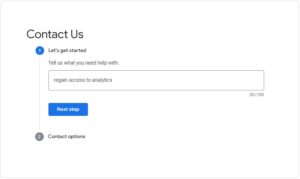
5. Select Chat or Email to contact a Google representative and let them know you have taken the steps above

6. You will receive an email or chat to a Google Specialist who will follow up and resolve your problem.